The Role of QR Codes in Caches: A Practical Guide 2026

QR codes have become an indispensable part of modern geocaching. Once you delve into the role of QR codes in caches, you quickly realize that these small squares can do much more than just provide a link. They connect physical hiding spots with digital content, make puzzles more interactive, and simplify the maintenance of entire cache series. At the same time, they come with risks that many geocachers don't consider enough. This article shows you how to use QR codes correctly in geocaching, what to look out for when scanning, and how to create secure, durable codes as a cache owner.
Table of Contents
- Key Takeaways
- Basics and Functionality of QR Codes
- Security Aspects and Risks of QR Codes
- Design and Use in Outdoor Environments
- Interactive Use Cases and Experiences
- Legal and Ethical Considerations
- My Assessment of the Future of QR Codes
- Robust Equipment for Your Next Cache
- FAQ
Key Takeaways
| Point | Details |
|---|---|
| QR Codes Connect Worlds | A single scan instantly connects finders with digital content, without technical hurdles. |
| Dynamic Codes Save Work | Target links can be changed at any time without reprinting the code or opening the cache. |
| Security Lies in the URL | The code itself is not dangerous, but where it links to. Always check the URL. |
| Design Determines Readability | Error correction level H and a wide quiet zone make codes weather-resistant and scannable. |
| Data Protection is Mandatory | Cache owners who use scan tracking must be transparent with user data. |
Basics and Functionality of QR Codes
QR stands for “Quick Response.” The code stores data in a two-dimensional pattern of black and white modules. Modern smartphones recognize these patterns directly via the camera, without a separate app. This makes the use of QR codes in geocaching particularly low-threshold.
Static vs. Dynamic QR Codes
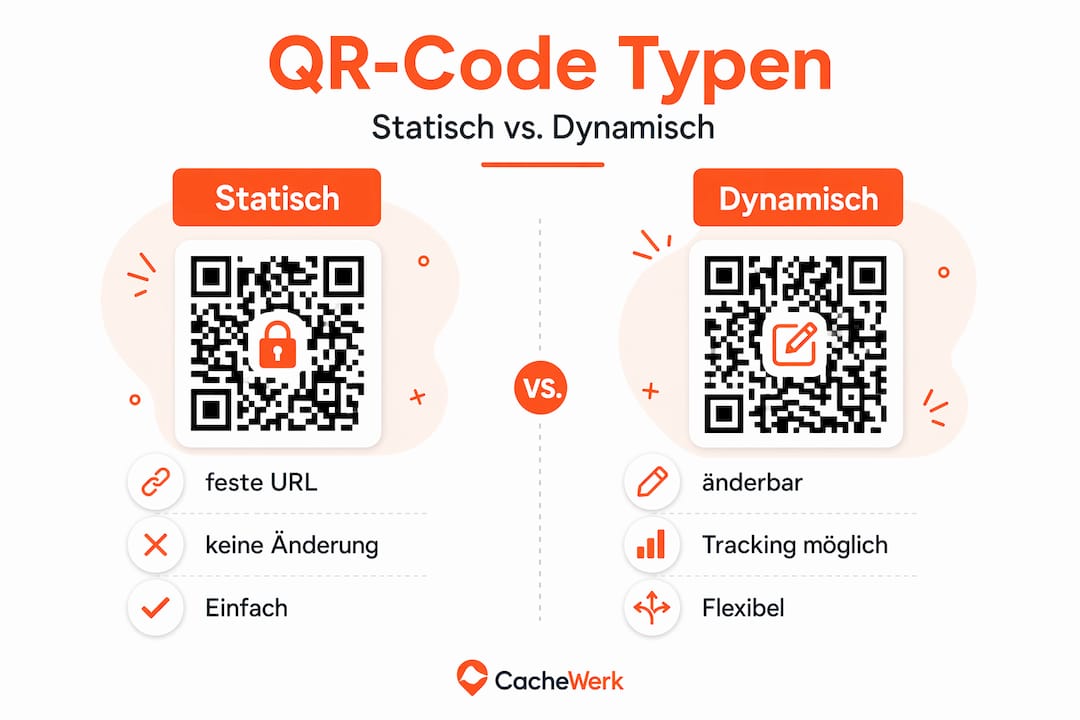
The most important distinction for cache owners is between static and dynamic codes. A static code directly encodes the target URL. Once printed, nothing can be changed. A dynamic code contains a short redirect URL, which allows you to adjust the target page at any time. Dynamic QR codes allow you to update target links without re-printing. For caches that are meant to remain active for years, this is a real advantage.
Typical Use Cases in Caches
The possibilities for using QR codes in a geocache are more diverse than many think:
- Hints and Spoiler Pages: A code leads to a hidden hint that only becomes visible after scanning.
- Logbook Extensions: Finders log digitally and leave photos or comments.
- Puzzle Extensions: The code links to a page with a further puzzle or the next coordinates.
- Multimedia Content: Audio files, videos, or images related to the cache's history are linked.
- Cache Descriptions: Supplementary information that doesn't fit into the physical container.
A single QR scan connects users directly with digital content, reduces effort, and increases motivation during the search. Especially for complex multi-caches or mystery caches, this opens up entirely new design possibilities.
Pro Tip: For outdoor caches, always use error correction level H when creating your QR code. This ensures the code remains scannable even with 30% damage from dirt, water, or mechanical abrasion.
Security Aspects and Risks of QR Codes
QR codes themselves are technically neutral. The danger lies not in the code, but in where it leads. Attackers use manipulated codes to lure users to fake sites. This attack pattern is called “quishing” and is on the rise worldwide.
“QR codes are not the security problem. Clear visibility of the URL and avoiding short links are crucial.” (Source: Palo Alto Networks Unit 42)
The numbers are alarming. There are over 11,000 detections of malicious QR codes daily, often via manipulated short links and in-app deep links. This is not an abstract IT problem. In Essen, 25 parking ticket machines were tampered with fake QR codes to steal payment data. What happens in the city can just as easily happen with a geocache.
How to Protect Yourself as a Finder
When scanning a QR code in a cache, a few simple rules apply:
- Always Read the URL: Check the displayed address before opening. Does the domain look trustworthy?
- Avoid Short Links: Codes that lead to link shorteners (e.g., bit.ly, tinyurl) are harder to verify. Distrust is advisable.
- Do Not Enter Login Details: A geocaching site that requests your login and you don't recognize is a warning sign.
- Use a QR Scanner with URL Preview: Many scanning apps display the target URL before the browser opens. Actively use this feature.
- Report Unexpected Codes: If a QR code in the cache looks different from what the cache description states, report it to the cache owner.
How to Apply Secure Codes as a Cache Owner
Cache owners should attach QR codes in a way that makes manipulation visible to finders. Tamper-evident foils or sealed laminates help with this. Also, clearly state in the cache description which domain the QR code will open. This allows finders to immediately recognize if someone has swapped the code.
Design and Use in Outdoor Environments
A QR code used outdoors must withstand more than a code on a poster. Rain, UV radiation, frost, dirt, and mechanical contact make printing on regular paper useless. The right design from the outset is crucial here.

Design Standards that Really Work
The quiet zone, i.e., the white border around the code, should be at least 4 modules wide. If this border is missing, scanners cannot correctly capture the code. Error correction level H allows up to 30% of the code to be damaged and still be scannable. This is simply indispensable for outdoor environments. Modern smartphones still reliably recognize codes even if damaged, provided these standards are met.
| Feature | Recommendation for Outdoor Use |
|---|---|
| Error Correction | Level H (30% recovery) |
| Quiet Zone | At least 4 modules wide |
| Material | Laminated or UV-laminated paper, plastic, or PETG print |
| Color | High contrast: black on white, no grayscale |
| Size | Minimum 3 x 3 cm for reliable scanning at a distance |
Dynamic Codes as Maintenance Helpers
A dynamic QR code solves a specific problem: you don't have to open the cache if the linked page changes. The target URL can be flexibly adjusted without needing to print a new code. For cache owners managing multiple hides, this is a real time-saver.
Pro Tip: Always use a domain you control for dynamic codes. Third-party shortlink services can be shut down or change the URL. Your own subdomains or a dedicated redirect service ensure the long-term functionality of your cache.
Tips for marking and robust design of your caches can also be found in our blog post on cache marking.
Interactive Use Cases and Experiences
Those who only view QR codes as link carriers miss out on potential. Truly exciting caches use them as interactive tools. Here are five concrete applications that add real depth to the geocaching experience:
-
Multi-stage Puzzles: The QR code in the first cache leads to a page with the next puzzle. The solution to the puzzle provides the coordinates of the second hiding spot. No paper, no wear and tear, no unreadable clues.
-
Photo Challenges: The code links to a form that prompts finders to take a photo at a specific point and upload it. This creates a vibrant gallery for the cache.
-
Spoiler Flows: Finders can request a hint without it being directly visible in the cache. Dynamic QR codes with server-side tracking even enable personalized hint flows: A person visiting the cache for the second time automatically receives different content.
-
Challenges and Achievements: A code confirms that a finder was at a specific location. This can be linked to challenge caches or community events.
-
Historical Information: For caches at historical sites, the code can lead to photos, texts, or audio clips about the history of the location. This transforms a simple treasure hunt into an educational experience.
The crucial point: The more interaction you incorporate, the more important usability becomes. A QR code that leads to a poorly optimized mobile page or takes minutes to load immediately destroys the experience. Test your links regularly and keep the linked pages as simple as possible.
Legal and Ethical Considerations
Cache owners using dynamic QR codes with tracking are dealing with personal data. This has legal consequences.
- Transparency is Mandatory: If the QR code collects scan data (time, location, device), finders must be informed. A brief note in the cache description is often sufficient.
- Implement Data Minimization: Only collect data that is truly needed. If you only want to know how often a cache is found, there's no need to store IP addresses.
- GDPR Also Applies Here: Cache owners based in Germany or the EU must comply with the General Data Protection Regulation. This also affects third-party tracking services.
- No Redirection to Advertising: QR codes in caches must not lead to commercial sites unrelated to the cache. This is not only ethically questionable but also violates geocaching guidelines.
- Openness to the Community: If you use innovative technology in the cache, document it in the description. This builds trust and prevents finders from assuming the code has been tampered with.
The responsibility lies with the cache owner. Those who use QR codes wisely and communicate openly strengthen trust in the entire community.
My Assessment of the Future of QR Codes
Over the years, I've seen many caches where QR codes were glued in as an afterthought. Often without protection, with a static URL to a domain that no longer exists. That's a shame because the potential is truly enormous.
What excites me most about QR codes in geocaching is that they drastically lower the technical barrier for finders while offering cache owners immense flexibility. I've encountered caches where a dynamic code functioned perfectly for weeks, even though the linked page was updated twice. No need to open the container, no new laminating, no stress.
However, I also observe that many geocachers scan QR codes without checking the displayed URL. This is a real security risk, and I believe the community doesn't discuss it enough. My urgent advice: Teach it forward. Anyone placing a cache with a QR code should briefly explain in the description what the code does and which domain it opens.
For the future, I see dynamic codes with context-sensitive content as the most exciting area. Caches that react to the finder, build stories, and respond individually. This isn't science fiction. The technology already exists, and initial experiments in the community show where this is headed.
— Benedikt
Robust Equipment for Your Next Cache
Good ideas need good materials. If you want to integrate QR codes into your next cache, you should opt for weather-resistant and durable components. At Cachewerk, you'll find exactly that: robust cache containers, camouflage materials, and accessories that will still work after years outdoors. Our 3D-printed products made of PETG easily withstand moisture, cold, and UV radiation. Perfect for caches where you want to integrate a laminated or directly printed QR code. Check out our geocaching accessories and find the right foundation for your next hide.
FAQ
What is the role of QR codes in caches?
QR codes connect the physical cache with digital content such as hints, puzzles, or multimedia. They make caches more interactive and simplify maintenance through dynamic links.
Are QR codes safe in geocaching?
QR codes themselves are neutral. The safety depends on where they link to. Finders should always check the displayed URL before trusting a page.
What is the difference between static and dynamic QR codes?
Static codes contain the URL hardcoded and cannot be changed. Dynamic codes redirect via a proxy whose target can be adjusted at any time without reprinting the code.
Which error correction level is recommended for outdoor caches?
Error correction level H is recommended for outdoor use. It allows for up to 30% damage to the code without losing readability.
May a cache owner collect scan data via QR codes?
Yes, but only with transparency towards the finders. According to the GDPR, users must be informed when data is collected. A notice in the cache description is mandatory.